
Offline URL Encoder Free
Percent-encode a string so it is safe to use in URLs, query strings, and API requests.
Runs offline in Devy, a desktop app with 234 developer tools for Windows, macOS and Linux. Free in Devy Tools, with no account and no time limit.
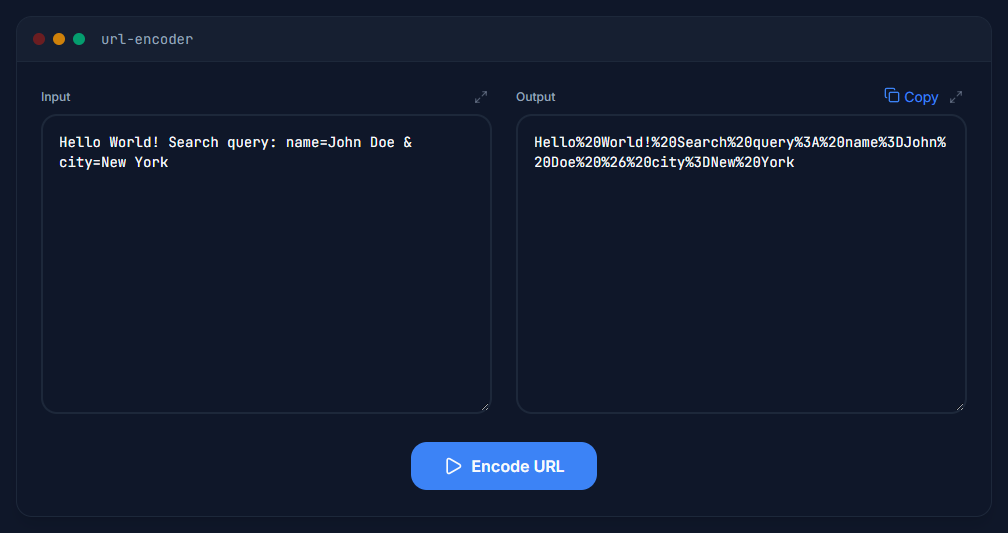
What the URL Encoder is for
URLs can only contain a limited set of characters. URL encoding (percent-encoding) replaces everything else (spaces, &, =, #, non-English letters) with % and the byte's hex value, so a value can sit safely in a query string or path.
Devy encodes text as UTF-8, the way browsers and encodeURIComponent do.
Example
Text
name=Asha Kumar&city=São PauloEncoded
name%3DAsha%20Kumar%26city%3DS%C3%A3o%20PauloWhy use it offline
Encoded strings are often tokens, cookies and credentials. Decode them on your own computer instead of a website that could log what you paste.
- Nothing you paste or open is uploaded
- Works on a plane, behind a VPN or with no network
- No ads, no sign-up, opens in a second
How to use the URL Encoder
- Download Devy for Windows, macOS or Linux and open it.
- Search for “URL Encoder” on the home screen, or open the Encoding & Decoding category.
- Paste your input or open a file, then copy or save the result.
Good to know
- Encode each value, not the whole URL. Encoding https:// turns the colon and slashes into %3A and %2F and breaks the link.
- A space is %20 in most of a URL; HTML forms send + instead in the query string. Both usually work in query strings, only %20 in paths.
- Encoding twice turns % into %25 (for example %20 → %2520), a common cause of broken redirects.
More encoding & decoding tools in Devy
Questions
Which characters don't get encoded?
Letters, digits and - _ . ~ are left as they are. Everything else is percent-encoded.
Is the URL Encoder free?
Yes. The URL Encoder is one of the 45 tools in Devy's free plan. There's no account, no trial to run out and no limit on use.
Does it send my data anywhere?
No. The URL Encoder runs inside the Devy desktop app on your computer. What you paste or open isn't uploaded, logged or shared, and it works with no internet connection.
Which computers does it run on?
Windows, macOS and Linux. Download Devy from this site or install it from the Microsoft Store.