
Offline QR Code Generator Free
Create QR codes from text or URLs.
Runs offline in Devy, a desktop app with 234 developer tools for Windows, macOS and Linux. Free in Devy Tools, with no account and no time limit.
What the QR Code Generator is for
A QR code stores text, usually a URL, as a square pattern any phone camera can read. Use one on printed material, slides, packaging or a screen to send people to a page without typing.
Devy creates the QR code on your computer, with your choice of size, error correction and colours, and downloads it as a PNG.
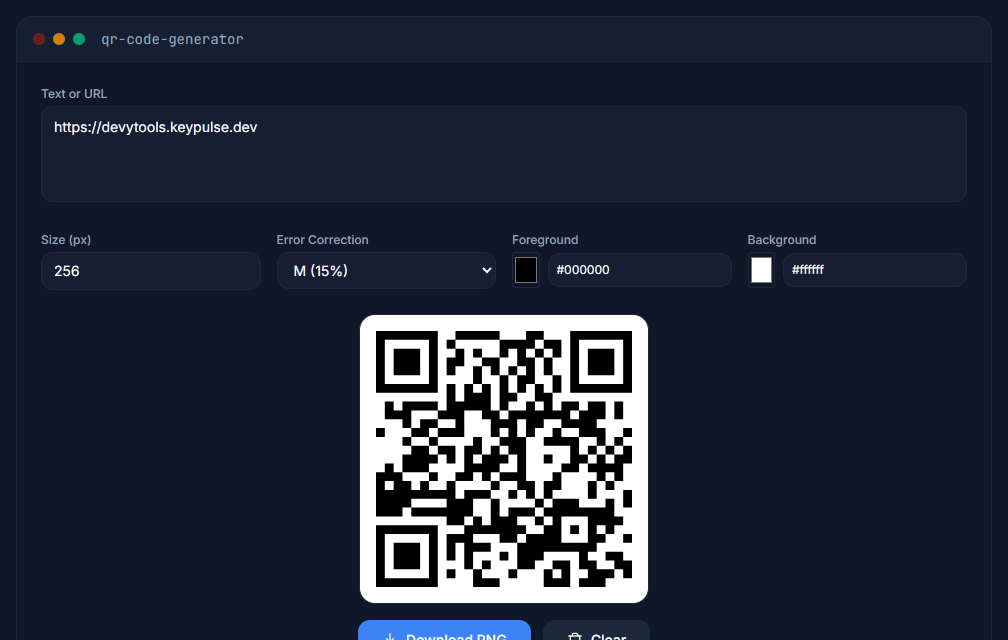
Example
Text or URL
https://devytools.keypulse.devResult
A 256 × 256 PNG QR code, error correction M (15%)Why use it offline
Generate IDs, passwords and test data locally. Nothing you generate is sent over the network.
- Nothing you paste or open is uploaded
- Works on a plane, behind a VPN or with no network
- No ads, no sign-up, opens in a second
How to use the QR Code Generator
- Download Devy for Windows, macOS or Linux and open it.
- Search for “QR Code Generator” on the home screen, or open the Generators category.
- Paste your input or open a file, then copy or save the result.
Good to know
- Keep a dark pattern on a light background; inverted or low-contrast colours confuse many scanners.
- Higher error correction (Q or H) survives damage or a logo in the middle, but makes the pattern denser.
- Shorter text gives a simpler code that's easier to scan from a distance.
- Leave a quiet margin around the code when printing it.
More generators tools in Devy
Questions
Do the QR codes expire?
No. The code contains your text directly; there's no redirect service in between that could stop working.
Is the QR Code Generator free?
Yes. The QR Code Generator is one of the 45 tools in Devy's free plan. There's no account, no trial to run out and no limit on use.
Does it send my data anywhere?
No. The QR Code Generator runs inside the Devy desktop app on your computer. What you paste or open isn't uploaded, logged or shared, and it works with no internet connection.
Which computers does it run on?
Windows, macOS and Linux. Download Devy from this site or install it from the Microsoft Store.