
Offline Password Generator Free
Create strong, random passwords.
Runs offline in Devy, a desktop app with 234 developer tools for Windows, macOS and Linux. Free in Devy Tools, with no account and no time limit.
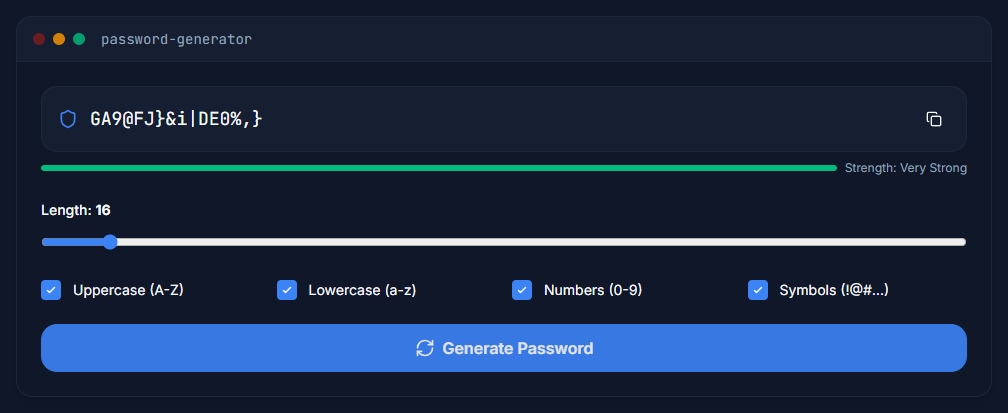
What the Password Generator is for
A password generator creates random passwords from the characters you choose. Randomness is what makes a password strong: people choosing their own tend to follow patterns that cracking tools try first.
Devy generates passwords on your computer with the operating system's secure random generator, with the length and character types you choose, and shows how strong each one is.
Example
Settings
Length 16 · upper case · lower case · numbers · symbolsExample
k>)hM!:?Dj8nCkIuWhy use it offline
Generate IDs, passwords and test data locally. Nothing you generate is sent over the network.
- Nothing you paste or open is uploaded
- Works on a plane, behind a VPN or with no network
- No ads, no sign-up, opens in a second
How to use the Password Generator
- Download Devy for Windows, macOS or Linux and open it.
- Search for “Password Generator” on the home screen, or open the Generators category.
- Paste your input or open a file, then copy or save the result.
Good to know
- Length matters more than complexity: each extra character multiplies the number of possible passwords.
- Use a different password for every account, and keep them in a password manager.
- Some sites reject certain symbols. If a password is refused, turn symbols off and add length instead.
More generators tools in Devy
Questions
Are the generated passwords stored or sent anywhere?
No. They're created on your computer and shown only to you.
How long should a password be?
At least 12 characters; 16 or more with all character types is a good default for accounts that matter.
Is the Password Generator free?
Yes. The Password Generator is one of the 45 tools in Devy's free plan. There's no account, no trial to run out and no limit on use.
Does it send my data anywhere?
No. The Password Generator runs inside the Devy desktop app on your computer. What you paste or open isn't uploaded, logged or shared, and it works with no internet connection.
Which computers does it run on?
Windows, macOS and Linux. Download Devy from this site or install it from the Microsoft Store.