
Offline JSON Formatter Free
Format and prettify JSON data with ease.
Runs offline in Devy, a desktop app with 234 developer tools for Windows, macOS and Linux. Free in Devy Tools, with no account and no time limit.
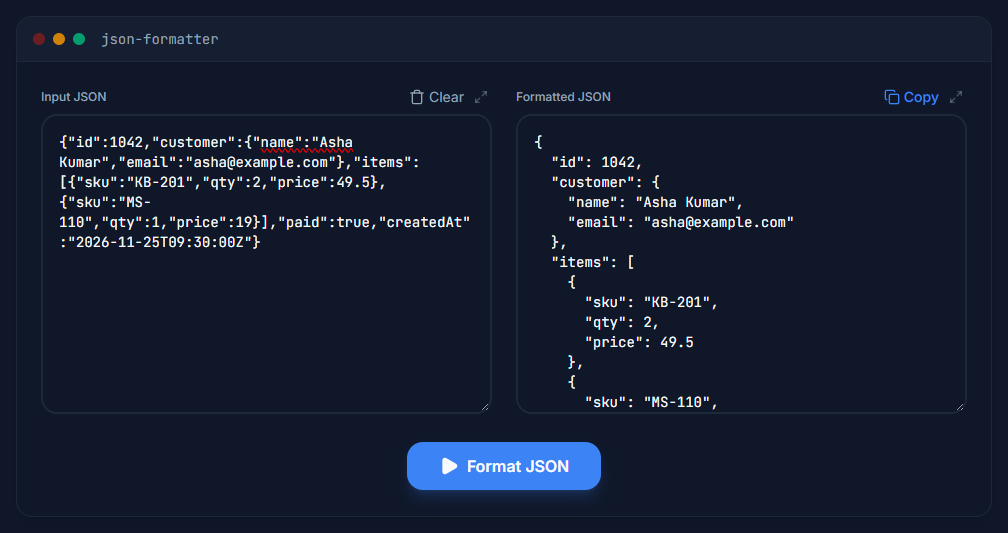
What the JSON Formatter is for
API responses, log lines and config exports usually arrive as one long line of JSON. A JSON formatter re-indents it so you can see its structure: which keys sit inside which objects, how long arrays are, and where a value is missing.
In Devy you paste the JSON on the left, press Format JSON and copy the indented result from the right. If the JSON is invalid, Devy tells you instead of guessing.
Example
Minified JSON
{"id":1042,"customer":{"name":"Asha Kumar","email":"[email protected]"},"items":[{"sku":"KB-201","qty":2}],"paid":true}Formatted
{
  "id": 1042,
  "customer": {
    "name": "Asha Kumar",
    "email": "[email protected]"
  },
  "items": [
    {
      "sku": "KB-201",
      "qty": 2
    }
  ],
  "paid": true
}
Why use it offline
Formatting is where production data ends up: API responses, config files, query logs. In Devy it never leaves your computer, so you can paste the real thing.
- Nothing you paste or open is uploaded
- Works on a plane, behind a VPN or with no network
- No ads, no sign-up, opens in a second
How to use the JSON Formatter
- Download Devy for Windows, macOS or Linux and open it.
- Search for “JSON Formatter” on the home screen, or open the Formatters category.
- Paste your input or open a file, then copy or save the result.
Good to know
- Formatting never changes the data: only whitespace between tokens is added or removed.
- If formatting fails, the input isn't valid JSON. Trailing commas, single quotes and comments are the usual causes; the JSON Validator shows where.
- Real API responses often contain tokens, emails and customer records. That's the main reason to format them offline rather than on a website.
More formatters tools in Devy
Questions
What's the difference between formatting and minifying JSON?
Formatting adds line breaks and indentation so people can read it. Minifying removes all of that to make the JSON as small as possible for sending or storing. Devy has both: the JSON Formatter and the JSON Minifier.
Can it format very large JSON files?
Yes. It runs on your computer, so there's no upload limit; the practical limit is your computer's memory.
Is the JSON Formatter free?
Yes. The JSON Formatter is one of the 45 tools in Devy's free plan. There's no account, no trial to run out and no limit on use.
Does it send my data anywhere?
No. The JSON Formatter runs inside the Devy desktop app on your computer. What you paste or open isn't uploaded, logged or shared, and it works with no internet connection.
Which computers does it run on?
Windows, macOS and Linux. Download Devy from this site or install it from the Microsoft Store.